Curbcut for VS Code
Curbcut for VS Code checks your HTML, JSX/TSX, Vue and Svelte files against WCAG 2.2 while you edit. It works in VS Code and in editors that use Open VSX (such as VSCodium). The checks run on your device.
Install: VS Code Marketplace ·
Open VSX. Extension id: saffo.curbcut.
Free features
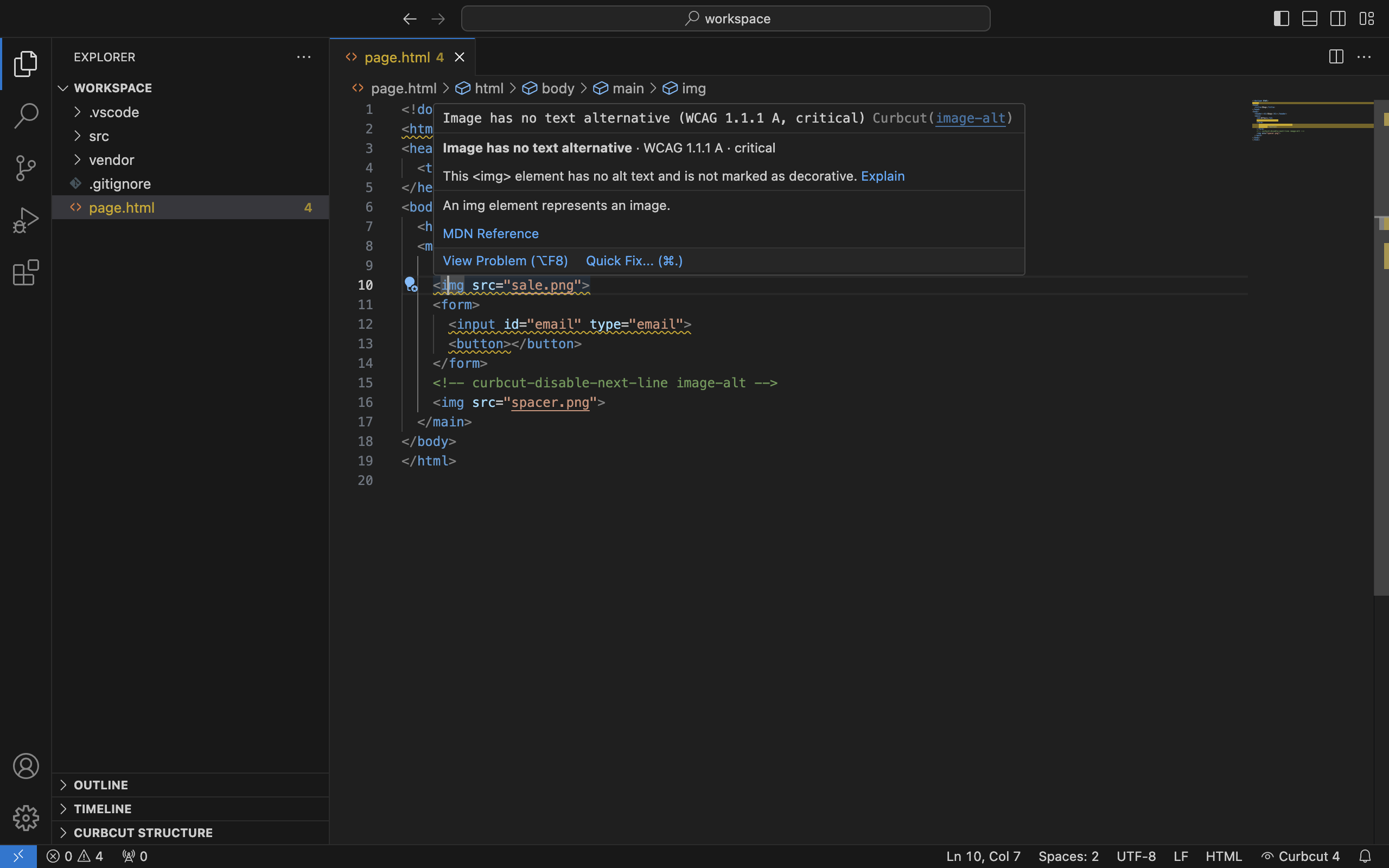
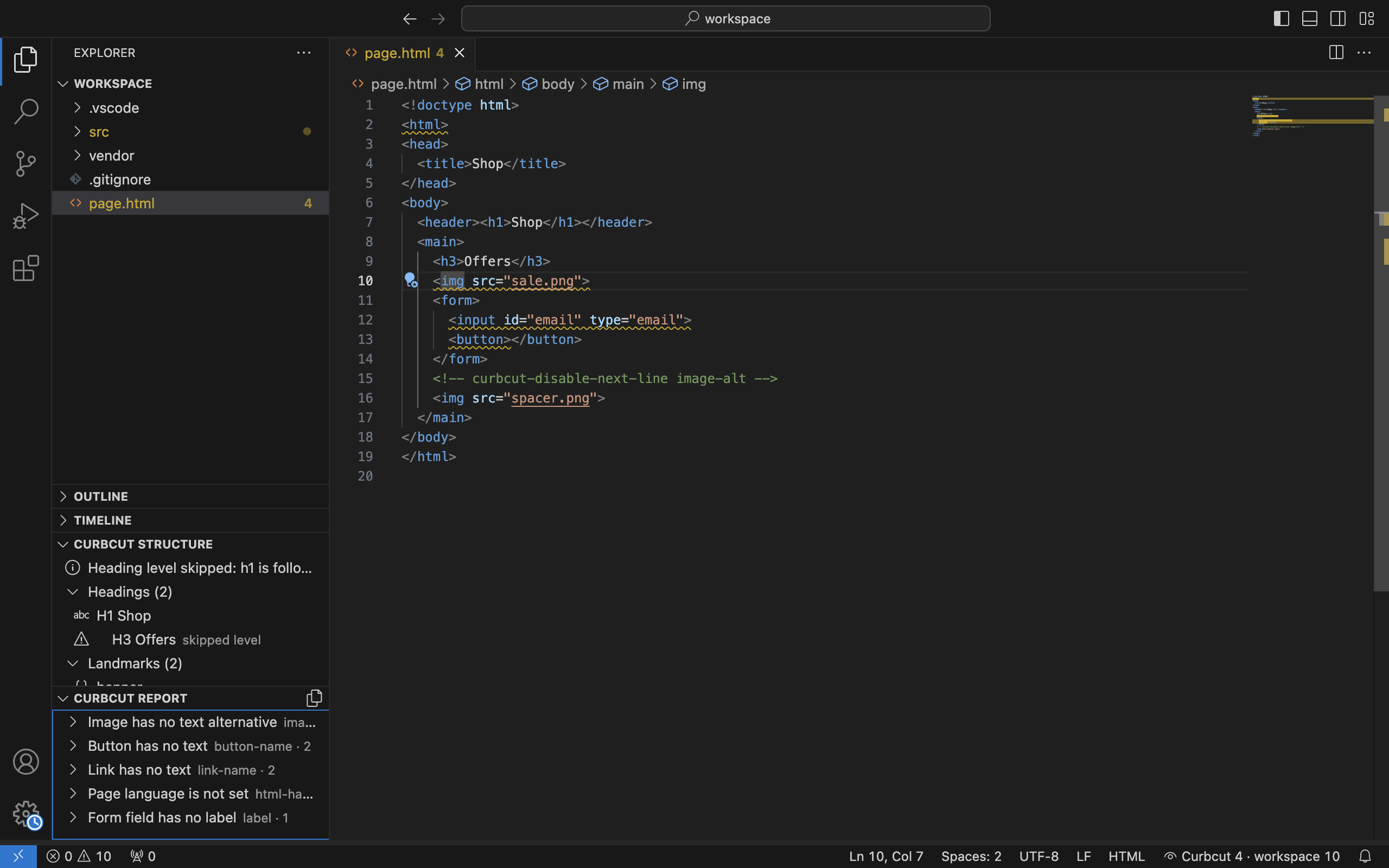
- Problems and squiggles: when you open or save a file, each issue appears in the Problems panel and as a squiggle on the element, with the rule, the WCAG criterion and the impact. Critical and serious issues are warnings, the rest are information.
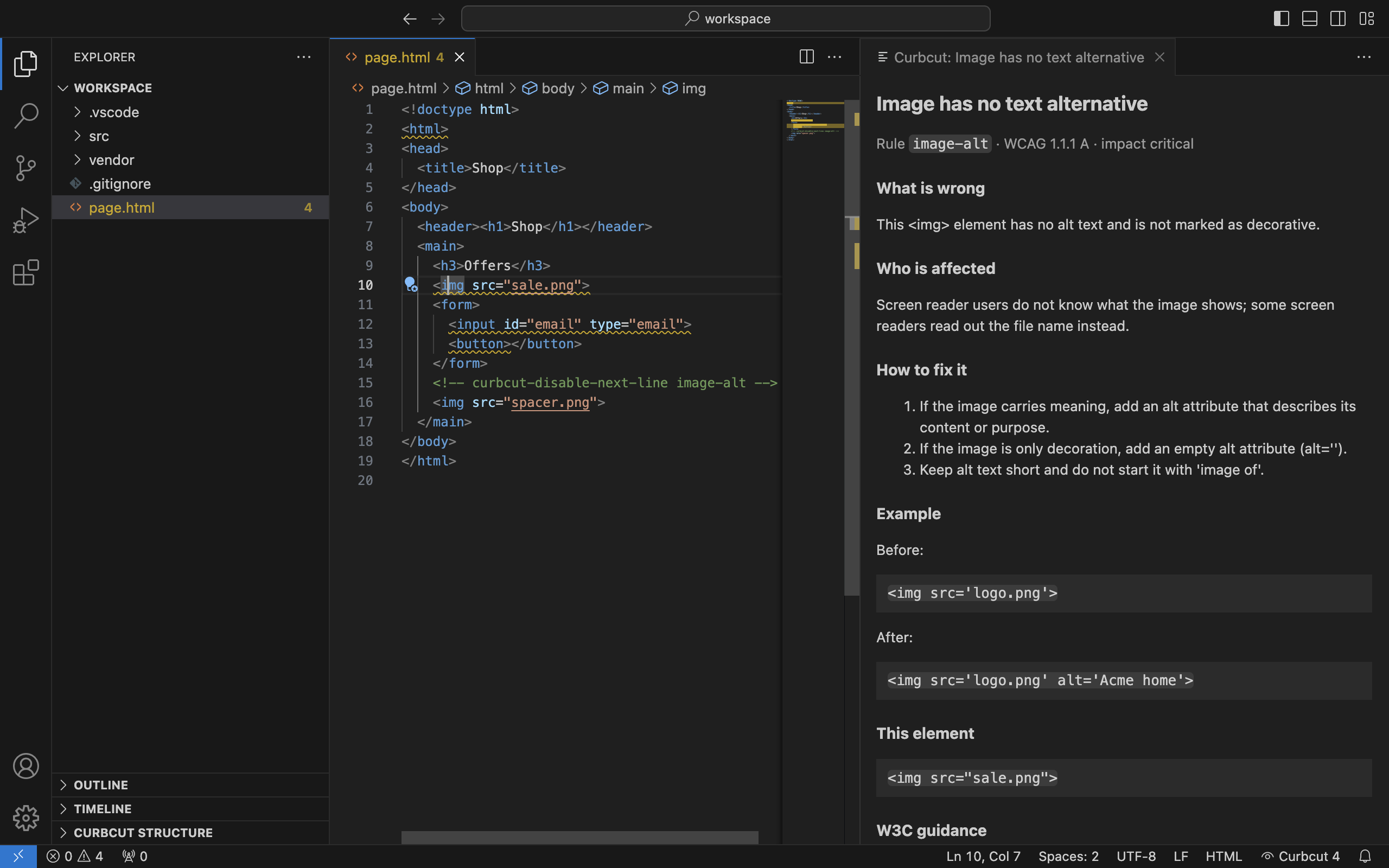
- Hover and explanation panel: hover an issue for a short summary. Explain (or the command Curbcut: Explain Issue) opens a panel with what is wrong, who it affects, the steps to fix it, a before and after example and the W3C Understanding link.
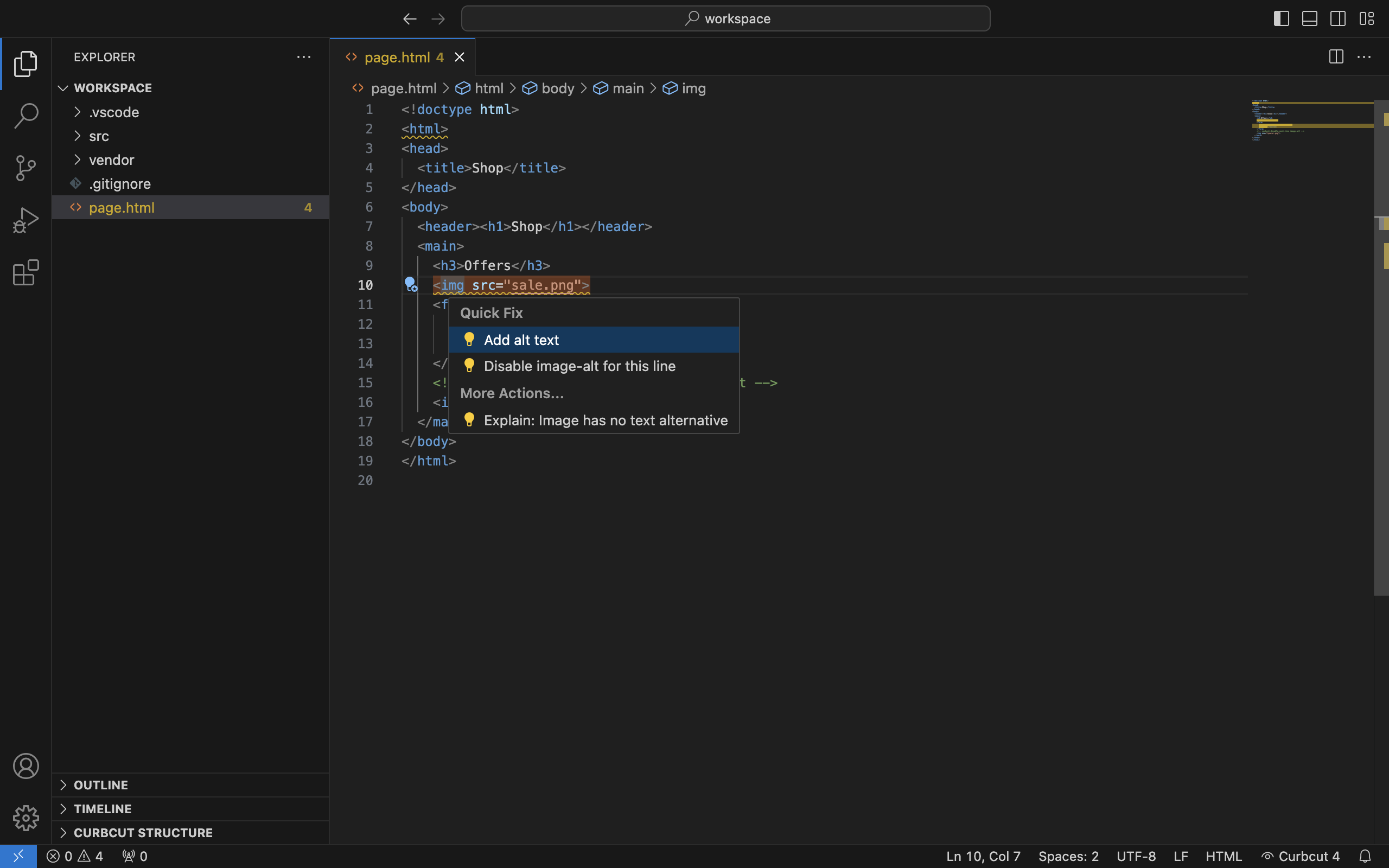
- Quick fixes: insert what is missing as a snippet to complete: an
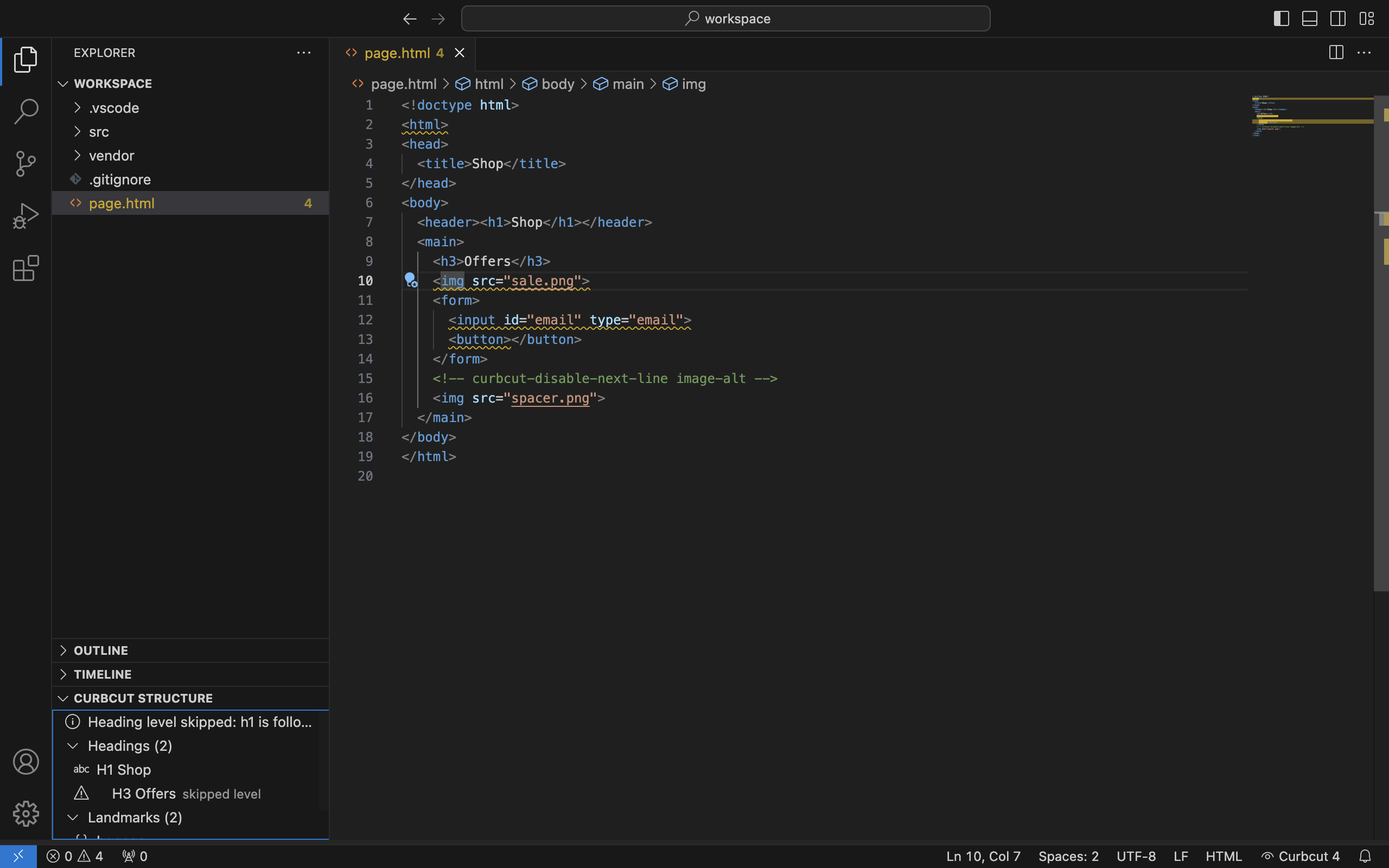
altattribute, anaria-labelon an icon-only button or link,langon thehtmlelement, alabeltied to an input. Another quick fix adds a disable comment for one line. - Headings and landmarks: the Curbcut Structure view in the Explorer lists the headings of the file (skipped levels marked) and its landmark elements. Click an item to go to its line.
- Status bar: the issue count of the active file. Click it to open the Problems panel.
Pro features
- Check Workspace: Curbcut: Check Workspace checks every matching file in the workspace. It skips files matched
by
files.exclude,.gitignoreandcurbcut.exclude. You can cancel it. The result is a tree grouped by rule or by file, and all issues go to the Problems panel. - Baseline: Curbcut: Save Baseline writes
.curbcut-baseline.jsonat the workspace root. It holds the rule, the file and a fingerprint of the element, no code. Issues in the baseline show as hints; new issues keep their severity. Commit the file to share the baseline with your team. - Export: Curbcut: Export Report writes the workspace result as SARIF 2.1.0, CSV or Markdown, to a path you choose.
Pro costs $49 per year. One license covers the browser extension and VS Code, on up to 5 activations. See pricing.
Settings
| Setting | Values | Default |
|---|---|---|
curbcut.wcagLevel |
A, AA or AAA |
AA |
curbcut.bestPractices |
true or false: also run checks that are good practice but not WCAG requirements |
false |
curbcut.runOn |
open, save or manual (only with Curbcut: Check Current File) |
open |
curbcut.exclude |
glob patterns of files not to check | none |
curbcut.componentMap |
your components mapped to the HTML elements they render, for example {"Image": "img", "Link": "a"} |
none |
Disable a check for one line
When a finding does not apply, put this comment on the line before the element:
<!-- curbcut-disable-next-line image-alt -->
<img src="divider.png">
In JSX and TSX:
{/* curbcut-disable-next-line image-alt */}
<img src={divider} />
Use the rule id from the issue. The quick fix writes the comment for you.
Activate Pro
- Buy Pro on the pricing page. Polar sends the license key by email.
- Run the command Curbcut: Activate Pro License.
- A notice tells you that the key and the label
vscodego to Polar (api.polar.sh) to verify the license. Paste the key.
The key is kept in VS Code SecretStorage, not in your settings or workspace. Curbcut re-checks the key with Polar at most once every 7 days. If it cannot reach Polar, Pro keeps working for 14 days after the last successful check. Curbcut: Deactivate Pro License frees the activation and removes the key.
Upload SARIF to GitHub code scanning
Export the report as curbcut-report.sarif, commit it (or create it in your build), and upload it in a workflow:
name: Accessibility
on: [push]
permissions:
  security-events: write
jobs:
  upload:
    runs-on: ubuntu-latest
    steps:
      - uses: actions/checkout@v4
      - uses: github/codeql-action/upload-sarif@v3
        with:
          sarif_file: curbcut-report.sarif
The issues then show in the repository's Security tab and on pull requests.
Limits
- Colour contrast, target size and focus order cannot be checked in source files, because they depend on the rendered page. Use the browser extension for them.
- Values known only at runtime (for example an
altset from a variable) are reported as unknown. Curbcut never guesses them. - Automated checks find only part of all WCAG failures. Test with a keyboard and a screen reader as well.
Privacy
The checks run on your device. The extension has no telemetry. The only network call is the license check with Polar described above. Read the privacy policy.